Best Gaming Mouse 2026: Top 10 Picks Ranked
The best gaming mouse picks of 2026, ranked — from the pro-favourite Logitech G Pro X Superlight 2 to budget legends, with pros, cons, a spec comparison and our top pick.
We ranked the ten best gaming mouse picks you can buy in 2026 — from 54-gram esports flyweights to feature-packed all-rounders. The single most important thing to understand before you spend a penny: the sensor war is over. Every mouse on this list tracks flawlessly. There is no meaningful accuracy difference between a $40 mouse and a $160 one anymore, and the giant DPI numbers on the box are pure marketing — nobody plays at 26,000 DPI.
So what are you actually paying for? Four things: weight, shape, wireless and switches. A lighter mouse flicks faster and fatigues your wrist less. The right shape for your grip is the difference between comfort and a sore hand after an hour. Good wireless removes cable drag entirely. And crisp switches feel better click-to-click. Those four levers are how we ranked this list.
Our overall recommendation is highlighted at the top, and every pick links to Amazon so you can check the current price. If you just want the short answer:
- Best overall: Logitech G Pro X Superlight 2
- Best for competitive FPS: Razer Viper V3 Pro
- Best ergonomic: Razer DeathAdder V3 Pro
- Best value: Razer Viper V3 HyperSpeed
- Best budget: Logitech G305 LIGHTSPEED
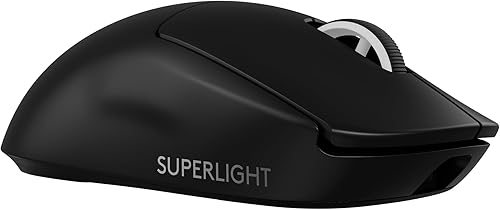
Logitech G Pro X Superlight 2
Best overallThe safe answer to "what's the best gaming mouse?" for most players. It's featherlight, the wireless is flawless, and the gently curved shape suits almost everyone — it's the mouse you'll see under more pro hands than any other.
- Ultralight 60g with a solid, hole-free shell
- Flawless 32K sensor and fast hybrid switches
- ~95 hour battery, LIGHTSPEED wireless
- The most-used shape in pro esports
- Premium price
- Minimalist — no extra buttons or RGB
- Charges over cable, no dock in box
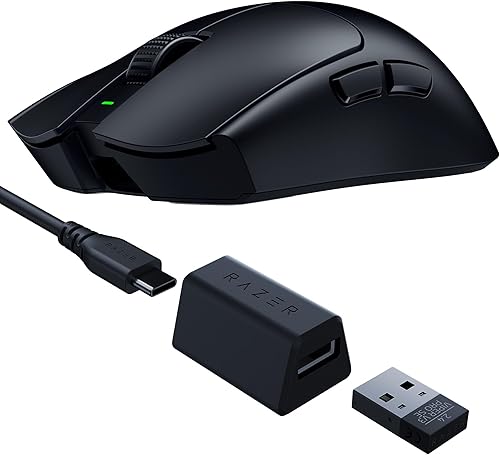
Razer Viper V3 Pro
Best for competitive FPSThe competitive FPS weapon. At ~54g with optional 8K polling and Razer's best sensor, it's built for one thing — raw aim. If you grind ranked shooters with a claw or fingertip grip, this is the one to beat.
- ~54g, one of the lightest flagships
- Optional 8,000Hz polling
- Elite Focus Pro 35K sensor
- Crisp, flat esports shape
- Expensive (8K dongle costs extra)
- No RGB
- Symmetrical shape suits claw/fingertip more than palm
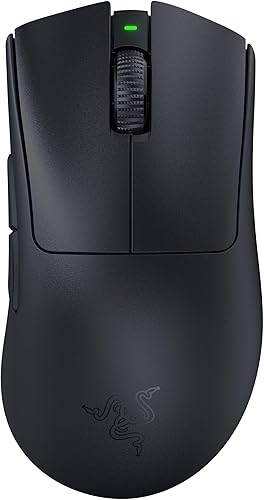
Razer DeathAdder V3 Pro
Best ergonomicProof that ergonomic mice can be ultralight too. It takes the most comfortable right-handed shape ever made and drops it to ~63g — if the flat Viper shape isn't for you, this is the flagship to get.
- Iconic ergo shape, now just ~63g
- Elite sensor and optical switches
- Long battery life
- Superb for palm and hybrid grips
- Right-handed only
- Premium price
- No RGB or extra buttons
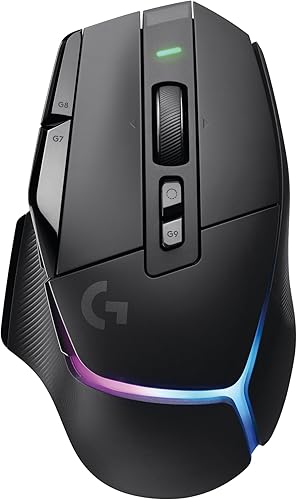
Logitech G502 X PLUS
Best all-rounderThe do-everything flagship. If you want buttons for days, a brilliant dual-mode scroll wheel and RGB — and you play MMOs or want one mouse for work and play — the wireless G502 X PLUS is unmatched.
- 13 programmable controls
- Dual-mode hyper-fast scroll wheel
- Per-key RGB and LIGHTSPEED wireless
- Great for MMO, MOBA and productivity
- Heavy (~106g) for pure FPS
- Expensive
- Large — not for small hands
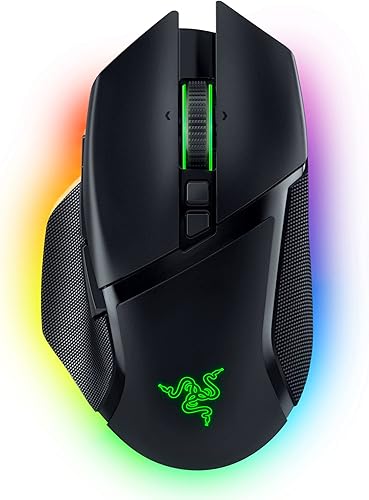
Razer Basilisk V3 Pro
Most feature-packedA luxury ergonomic mouse loaded with everything: a smart free-spinning wheel, tons of buttons and gorgeous underglow RGB. Ideal if you value comfort and features over shaving grams.
- 11 buttons + tilt-click scroll
- HyperScroll free-spin wheel
- Rich underglow RGB
- Comfortable ergo shape, optional charging dock
- Heavy (~112g)
- Pricey, especially with the dock
- Overkill for competitive FPS
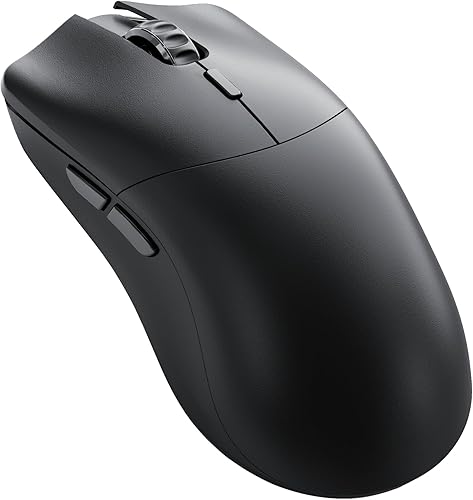
Glorious Model O 2 Pro
Best lightweight valueFlagship performance for less. A ~55g wireless flyweight with a top sensor and a solid shell, undercutting the Viper and Superlight. The value pick among the elite.
- ~55g, now with a solid (hole-free) shell
- Flagship-grade sensor
- Long battery life
- Costs less than the big-brand flyweights
- Software less polished than Razer/Logitech
- Fewer premium extras
- Shape best for claw/fingertip
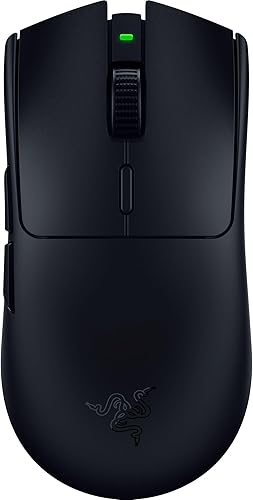
Razer Viper V3 HyperSpeed
Best mid-range wirelessThe sweet-spot wireless mouse. You get the beloved Viper shape and a near-flagship sensor for roughly half the price of the V3 Pro — the trade is a bit of extra weight from the AA battery. Superb value.
- Genuinely lag-free HyperSpeed wireless
- Excellent Focus Pro 30K sensor
- Huge ~280h battery on one AA
- Great Viper shape for far less money
- Heavier (~82g) due to AA battery
- No RGB
- No charging cradle
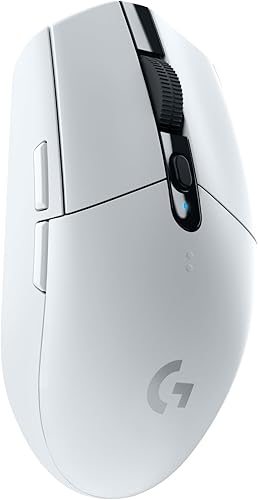
Logitech G305 LIGHTSPEED
Best budgetThe budget wireless legend and our top pick under $50. Nothing else near this price gives you genuinely lag-free wireless, and it lasts months on a single AA. A superb first "real" gaming mouse.
- Lag-free LIGHTSPEED wireless for cheap
- Up to 250h on one AA
- Reliable HERO sensor
- Compact and light
- No RGB
- Ambidextrous but small
- AA battery adds a little weight
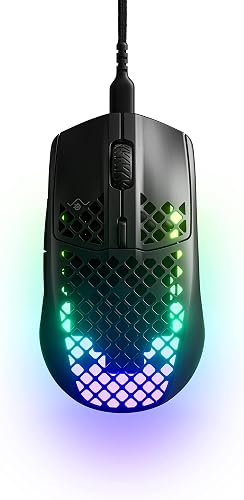
SteelSeries Aerox 3 Wireless
Best ultralight honeycombA rare ultralight that's also water-resistant. It pairs a ~68g honeycomb shell with IP54 protection and dual connectivity — great if you want light and durable without babying your mouse.
- Light ~68g honeycomb shell
- IP54 water and dust resistance
- Dual wireless (2.4GHz + Bluetooth)
- Bright RGB
- Honeycomb holes not for everyone
- Sensor good but not top-tier
- Small for large hands
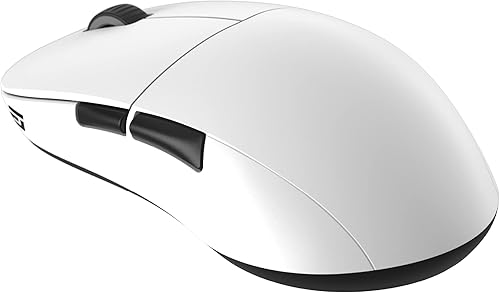
Endgame Gear XM2we
Best enthusiast valueThe enthusiast's quiet favourite. It nails the fundamentals — shape, weight, switches and glide — for noticeably less than the household names. A connoisseur pick if you already know what you want.
- Widely praised ~63g shape
- Excellent sensor and switches
- Flagship feel for a mid price
- Great glides and build quality
- Lesser-known brand
- Subtle single RGB
- Fewer buttons than big-brand rivals
Gaming mouse specs compared
| Mouse | Weight | Connection | Shape / best grip | Best for |
|---|---|---|---|---|
| G Pro X Superlight 2 | 60g | Wireless | Symmetrical · all grips | Best overall |
| Razer Viper V3 Pro | ~54g | Wireless (opt. 8K) | Flat symmetrical · claw/fingertip | Competitive FPS |
| DeathAdder V3 Pro | ~63g | Wireless | Ergonomic · palm/hybrid | Ergonomic comfort |
| G502 X PLUS | ~106g | Wireless | Ergonomic · palm | MMO / all-rounder |
| Basilisk V3 Pro | ~112g | Wireless | Ergonomic · palm | Features & RGB |
| Model O 2 Pro | ~55g | Wireless | Symmetrical · claw/fingertip | Lightweight value |
| Viper V3 HyperSpeed | ~82g | Wireless (AA) | Flat symmetrical · claw | Mid-range wireless |
| G305 LIGHTSPEED | ~99g | Wireless (AA) | Compact symmetrical · claw | Budget |
| Aerox 3 Wireless | ~68g | Wireless (2.4/BT) | Compact honeycomb · claw | Ultralight, durable |
| Endgame Gear XM2we | ~63g | Wireless | Safe symmetrical · all grips | Enthusiast value |
How to pick the right gaming mouse
Weight
Weight is the spec you'll feel most. Dropping from ~100g to ~60g makes flicks land faster, micro-adjustments cost less effort, and long sessions fatigue your wrist less. As a rough guide: under ~65g is ideal for competitive FPS; 65–80g is a comfortable sweet spot for most players; 80g+ is completely fine for MMO, MOBA and everyday use where you're not flicking. Past a point it's preference — some players like a little mass for stability on slow, precise tracking.
Shape and grip
This is the most personal spec, and the one most worth getting right. Your grip style should drive your choice:
- Palm grip (whole hand rests on the mouse) wants a taller, contoured ergonomic shell that fills your hand — the DeathAdder V3 Pro, G502 or Basilisk.
- Claw grip (arched fingers, only the palm heel touching) suits a lower, flatter symmetrical shape — the Viper, Superlight or Model O 2 Pro.
- Fingertip grip (only fingertips on the mouse, palm off) wants something small and light you can whip around — the Viper V3 Pro or a compact like the G305.
If you're not sure of your grip, watch how much of your palm actually touches the mouse during a normal game — that tells you most of what you need to know.
Wireless vs wired
The "wireless is slower" myth is dead. Modern 2.4GHz gaming wireless — LIGHTSPEED, HyperSpeed — is genuinely indistinguishable from a cable, and the entire top of the pro scene plays wireless. The only thing that's actually slower is Bluetooth, so use the dedicated dongle for gaming. If you can stretch to wireless, do; even the best paracord cable adds a little felt drag a dongle doesn't.
Sensor and DPI (don't overthink it)
Every mouse on this list has a flawless sensor. The four- and five-figure DPI numbers on the box are marketing — almost everyone plays between 400 and 1600 DPI, and what actually matters is your cm/360, the physical distance you move to turn all the way around. Keep that consistent across mice and games with our sensitivity converter, and read eDPI explained if the DPI-vs-sensitivity thing has ever confused you.
Whichever you choose, break it in on the click speed test, see how its switches hold up on the jitter and butterfly tests, and read our guide to improving your aim.
FAQ
What's the best gaming mouse overall in 2026? For most people it's the Logitech G Pro X Superlight 2 — 60g, flawless LIGHTSPEED wireless, and the most popular, most universally comfortable shape in pro esports. Dedicated competitive FPS players who claw or fingertip grip may prefer the even lighter Razer Viper V3 Pro.
Is an expensive gaming mouse worth it? You're paying for weight, wireless quality, build and switches — not accuracy. A budget mouse like the G305 tracks just as well; the flagships simply feel lighter and nicer in the hand. If a sub-$50 mouse fits your grip, you are not losing games because of it.
How much does mouse weight actually matter? Enough to feel immediately, especially for flick-heavy FPS. Most players notice the jump from ~90g to ~60g right away. Beyond roughly 60g it becomes preference rather than performance.
Wireless or wired for gaming? Wireless, if you can afford it. Modern 2.4GHz gaming wireless is as fast as wired and removes cable drag entirely. Only Bluetooth is meaningfully slower, so keep it for non-gaming use.
Which gaming mouse do pros use? The Logitech G Pro X Superlight line and Razer Viper series dominate the competitive FPS scene, with the DeathAdder V3 Pro popular among players who prefer an ergonomic shape. All three are on this list.
What DPI should I game at? Whatever gives you a comfortable cm/360 — most players land between 400 and 1600 DPI and adjust in-game sensitivity to taste. Set it once with the sensitivity converter and stop touching it; consistent muscle memory beats any DPI number.
Enough reading — how fast can you actually click?
Take the click speed test