Best Budget Gaming Keyboards Under $50 (2026)
The best cheap gaming keyboards under $50 in 2026 — mechanical and membrane picks with hot-swap, wireless and RGB, plus a comparison table, pros, cons and who each is for.
The sub-$50 keyboard tier is genuinely good in 2026 — good enough that spending more is now a want, not a need. Hot-swap sockets (change switches with no soldering), wireless tri-mode connectivity and even gasket mounts now show up at prices that would have seemed impossible a few years ago. You can get a real mechanical gaming keyboard, with switches that feel great and last for years, without going anywhere near flagship money.
What you're giving up at this price is mostly refinement, not capability. Budget boards use in-house switches rather than premium ones, plainer keycaps that can go shiny over time, and lighter software. None of that stops them being excellent for gaming — switch quality here is more than good enough for competitive play, and a 60% or TKL budget board frees up just as much mouse room as an expensive one.
Here are the best budget gaming keyboards under $50, from full-size mechanical to compact 60% boards, with a comparison table and buying advice further down. Links go to Amazon for the current price. The quick answer:
- Best overall / first mechanical: Redragon K552 Kumara
- Best wireless: Royal Kludge RK61
- Best full-size: Redragon K556
- Best premium feel: Aula F75
- Best durable membrane: HyperX Alloy Core RGB
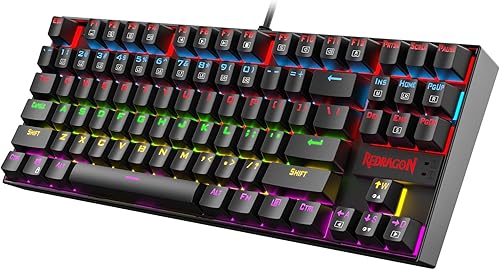
Redragon K552 Kumara
Best budget mechanicalThe default recommendation for a first mechanical keyboard, and still the one to beat. It gives you genuine mechanical switches and a metal top plate that feels far pricier than it is — everything you need to game, nothing you don't.
- Real mechanical switches (red/blue)
- Rugged metal top plate
- Full N-key rollover anti-ghosting
- Compact TKL layout saves desk space
- No wrist rest
- Basic software
- Non-detachable cable
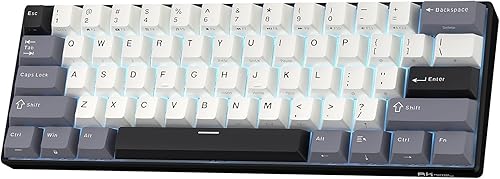
Royal Kludge RK61
Best wireless 60%A ridiculous amount of keyboard for the money — wireless, hot-swappable and 60% compact all at once. It's the cheapest gateway into the mechanical keyboard hobby, and the small footprint frees up plenty of desk for big low-sens mouse swings.
- Tri-mode: Bluetooth, 2.4GHz and wired
- Hot-swappable switches
- Tiny 60% footprint
- Great for low-sens FPS aiming
- 60% layout drops arrow/function keys
- Battery is modest
- Stabilisers need work out of the box
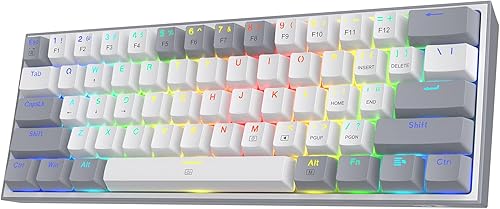
Redragon K617 Fizz
Best cheap 60%The cheapest way into the compact 60% form factor. Real mechanical switches, bright RGB and a detachable cable in a tiny board make it a superb value pick for a second setup or a tidy minimalist desk.
- Very cheap for a 60% mechanical
- Bright RGB
- Compact and light
- Detachable USB-C cable
- Wired only
- No hot-swap
- Small keys take adjustment
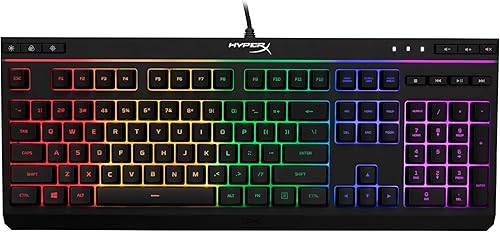
HyperX Alloy Core RGB
Best durable membraneIf you'd rather have quiet than clicky, this is the pick. It's a durable, spill-resistant membrane board from a trusted brand — no-fuss and dependable, and a smart choice for shared rooms or late-night sessions.
- Quiet membrane switches
- Spill resistant
- Solid, dependable build
- Dedicated media controls
- Membrane, not mechanical
- No key-by-key RGB zones
- Bulky with no detachable cable
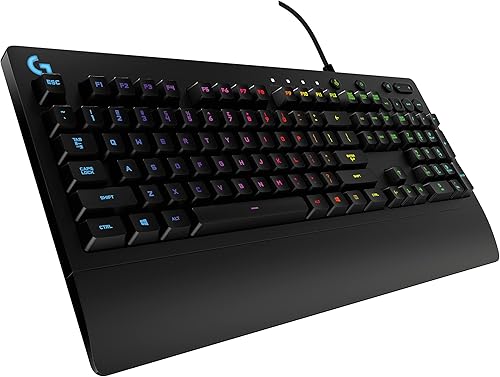
Logitech G213 Prodigy
Best brand membraneLogitech's dependable membrane board, and a comfortable daily driver. The mecha-membrane switches feel a touch snappier than most, and the volume roller plus integrated palm rest make it genuinely convenient day to day.
- Spill resistant
- Five RGB zones
- Dedicated media keys + volume roller
- Comfortable integrated palm rest
- Membrane feel
- Fairly heavy
- Zone RGB, not per-key
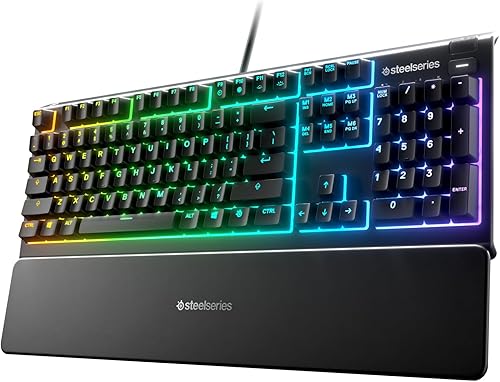
SteelSeries Apex 3
Most water-resistantBuilt for the clumsy: IP32 water resistance shrugs off the spills that kill most boards, and it's one of the quietest here. The included magnetic wrist rest and 10-zone RGB are a genuinely nice bonus at this price.
- IP32 water and dust resistant
- Whisper-quiet switches
- 10-zone RGB
- Magnetic wrist rest included
- Membrane switches
- No per-key lighting
- Not for those who want tactile clicks
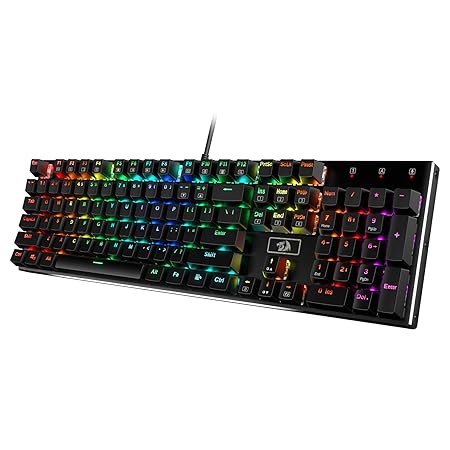
Redragon K556
Best full-size mechanicalThe default full-size pick for anyone who needs a numpad. Hot-swap sockets, a brushed aluminium base and a bundle of spare switches in the box make it remarkable value — the no-fuss desktop board.
- Full 104-key layout with numpad
- Hot-swappable switches
- Brushed aluminium base
- Comes with spare switches
- Wired only
- Outemu switch socket (limits some enthusiast swaps)
- Older, basic software
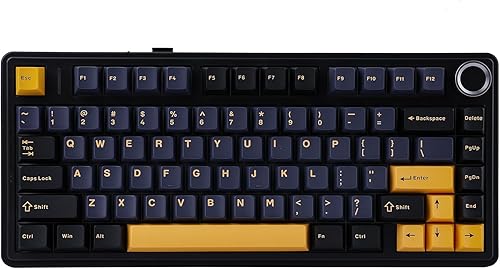
Aula F75
Best premium feelThe budget board that feels like a $120 one. Gasket mounting and pre-lubed switches give it a soft, satisfying typing feel you normally pay far more for — the enthusiast pick on a tight budget.
- Gasket-mounted for a softer typing feel
- Hot-swappable switches
- Wireless tri-mode on most versions
- Pre-lubed switches and stabs
- 75% layout takes adjustment
- Quality control can vary
- Heavier board
Budget gaming keyboards compared
| Keyboard | Switch type | Layout | Connection | Best for |
|---|---|---|---|---|
| Redragon K552 Kumara | Mechanical | TKL | Wired | First mechanical |
| Royal Kludge RK61 | Mechanical (hot-swap) | 60% | Wireless tri-mode | Wireless / FPS |
| Redragon K617 Fizz | Mechanical | 60% | Wired | Cheapest 60% |
| HyperX Alloy Core RGB | Membrane | Full-size | Wired | Durable / quiet |
| Logitech G213 | Membrane | Full-size | Wired | Brand membrane |
| SteelSeries Apex 3 | Membrane | Full-size | Wired | Spill resistance |
| Redragon K556 | Mechanical (hot-swap) | Full-size | Wired | Full-size + numpad |
| Aula F75 | Mechanical (gasket) | 75% | Wireless tri-mode | Premium feel |
Mechanical vs membrane — which should you get?
This is the core decision at this price, and both are legitimately good:
- Mechanical (K552, RK61, Fizz, K556, Aula F75): crisper, more defined keypresses, better per-key durability, and — on hot-swap boards — the ability to change switch feel later. Best for typing feel and anyone curious about the hobby.
- Membrane (Alloy Core, G213, Apex 3): quieter, cheaper, often spill-resistant, and perfectly capable for gaming. Best if you want no-fuss reliability, low noise, or you share a room.
Neither is "wrong" for gaming. Mechanical feels nicer and lasts longer per key; membrane is quieter and cheaper. Choose on feel and noise, not on which sounds more "gamer."
Layout for FPS
For competitive FPS, a 60% or TKL board (RK61, Fizz, K552) frees up desk space so you can make bigger low-sensitivity mouse swings without your hand hitting the keyboard. If you need a numpad for work or number-heavy games, go full-size (K556).
Hot-swap: nice, not essential
Hot-swappable sockets (RK61, K556, Aula F75) let you change switch feel later without soldering — great future-proofing if you think you'll fall down the keyboard rabbit hole. If you just want a board that works, it's a bonus you don't strictly need.
Got your keyboard? Try the spacebar speed test and see how fast you can mash — a board with clean, consistent switches makes a real difference.
FAQ
Are budget mechanical keyboards good for gaming? Yes. Switch quality at this price is more than good enough for competitive play; you're mainly paying more higher up for build materials, wireless, premium switches and typing refinement — none of which decides matches.
Do I need hot-swappable switches? Only if you think you'll want to change switch feel later without soldering. It's nice future-proofing (RK61, K556, Aula F75) and a gateway into the hobby, but it's not essential for gaming.
Mechanical or membrane for a cheap gaming keyboard? Mechanical if you want crisper feel and longer per-key life; membrane if you want quiet, spill resistance and the lowest price. Both game perfectly well — it comes down to feel and noise preference.
What's the best cheap wireless gaming keyboard? The Royal Kludge RK61 — it's tri-mode wireless, hot-swappable and 60% compact, which is a remarkable combination under $50. The Aula F75 is the pick if you want wireless with a bigger 75% layout and a more premium feel.
Is a 60% keyboard good for gaming? Yes, especially for FPS — dropping the numpad, function row and arrow cluster frees up a lot of desk space for big low-sensitivity mouse swings. The trade-off is that those keys move onto a modifier layer, which takes some time to get used to.
Enough reading — how fast can you actually click?
Take the click speed test